Practical AI for the people who build.
I build and use AI systems in construction estimating and across my work. This site brings together examples of what I’ve built and selected tools you can download for free.
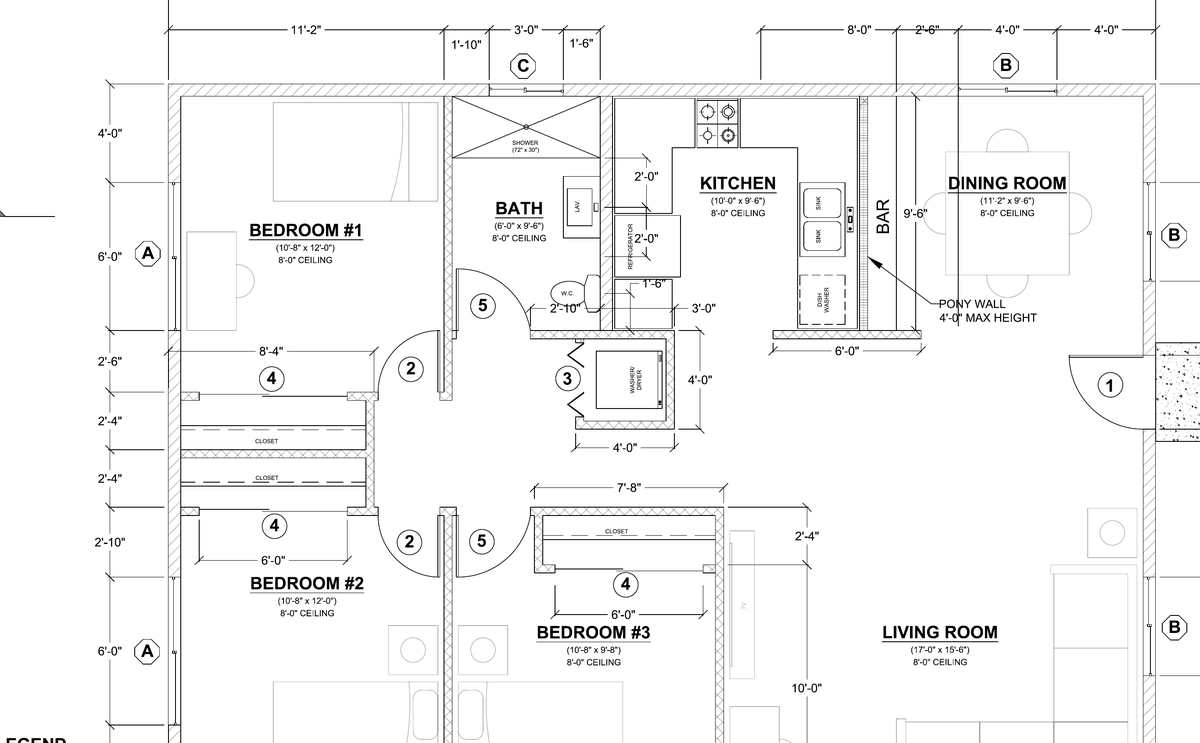
Plate 1. San Diego County Standard ADU Plan A, sheet A1. The system read this public plan set, checked it against the structural sheets, and handed an estimator a package to review. Pricing stayed with the estimator.

Construction worker. Contractor. AI builder.
My name is Bryon Leland Stafford. I started in the field, then built and ran Leland Construction for thirteen years. I have more than twenty years in San Diego construction and now estimate residential projects for a local builder.
That experience shapes how I build and use AI. I give it a clear scope, check the work against its sources, and make the final judgment when something is missing or the results disagree.
The plan reader.
It renders every page at 600 DPI and cuts it into overlapping tiles, because at full size you can't capture the detail you can with smaller, focused images. The text layer is pulled separately for notes, callouts, and schedules. Gemini reads every tile for symbols, dimensions, and schedules; a GPT model challenges the quantity-bearing sheets without seeing Gemini's answers. Every number is checked against the text layer or a close-up crop before it's accepted, and every fact carries its sheet reference.
Where the two readings disagree, the conflict is recorded and I settle it against the drawing. What the plans don't show gets written down as absent, not guessed. Before anything gets built from the numbers, a second reader goes through the same plans cold and we compare.
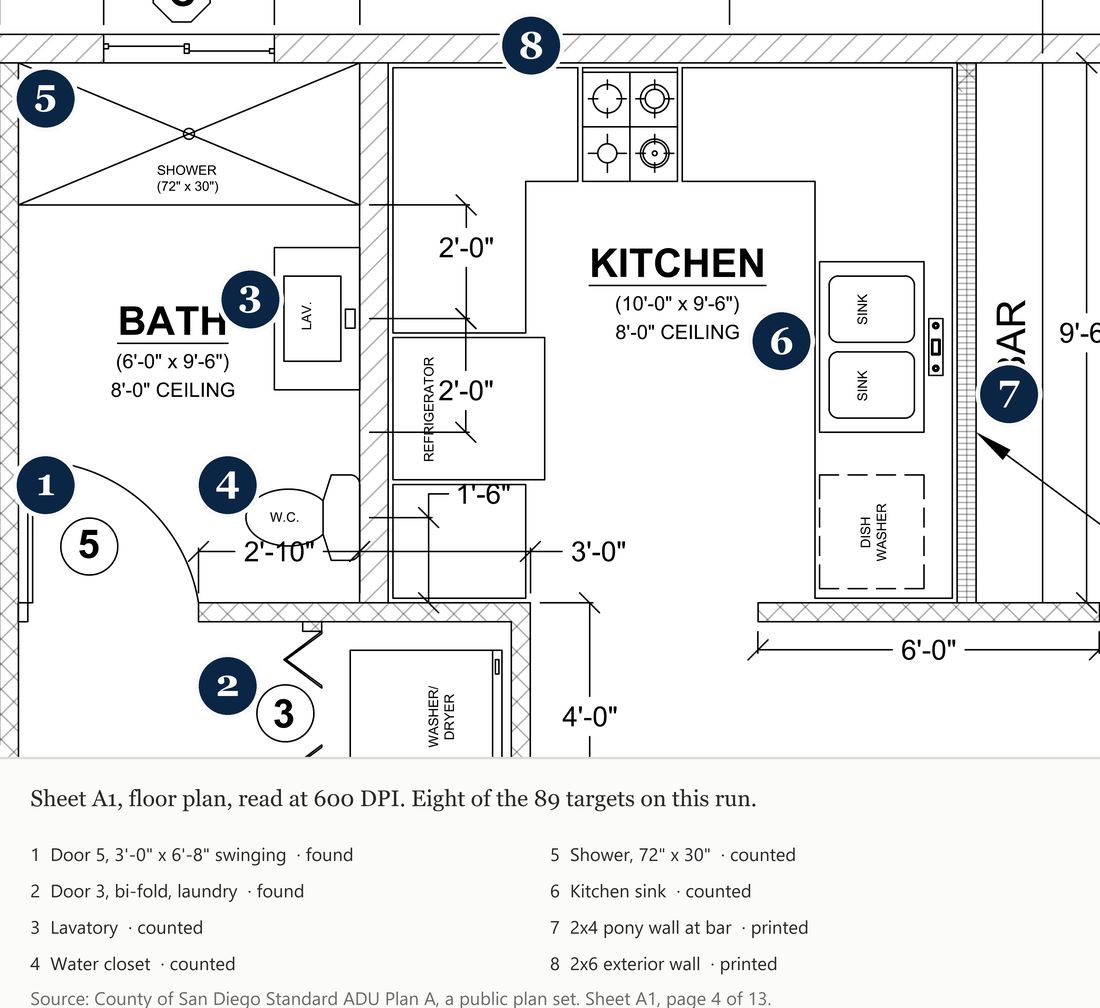
This is the tile where it counted the bath fixtures and read the door schedule. The numbered circles are eight of the 89 targets from the run.
The multi-model estimating system.
The reader feeds an estimating system that gives me back a sheet inventory, a quantity takeoff, scope organized by trade, an estimate structure with the prices left blank, and an RFI log for what the plans don’t say. Two models read the sheets independently, and I settle every disagreement before anything is accepted. I use it every day, and the two public ADU plan sets on this page are the same run I do at my desk.
On the public Plan A run, the cover sheet referenced an energy package that wasn’t in the 13 pages I gave it. It wrote that down as missing and parked five items behind one RFI instead of filling in a guess. That is the behavior I care about most.
Two AIs, one workspace, and a collaboration board.
I use Claude and Codex in the same workspace, with one building and the other checking the work. They communicate with each other through a collaboration board that keeps track of whose turn it is, the discrepancies that need to be resolved, the work that was just done, and what the next model is expected to do. This back and forth has been instrumental in producing much more accurate results. I walked the AI with Kyle community through the setup in August and shared the starter kit.
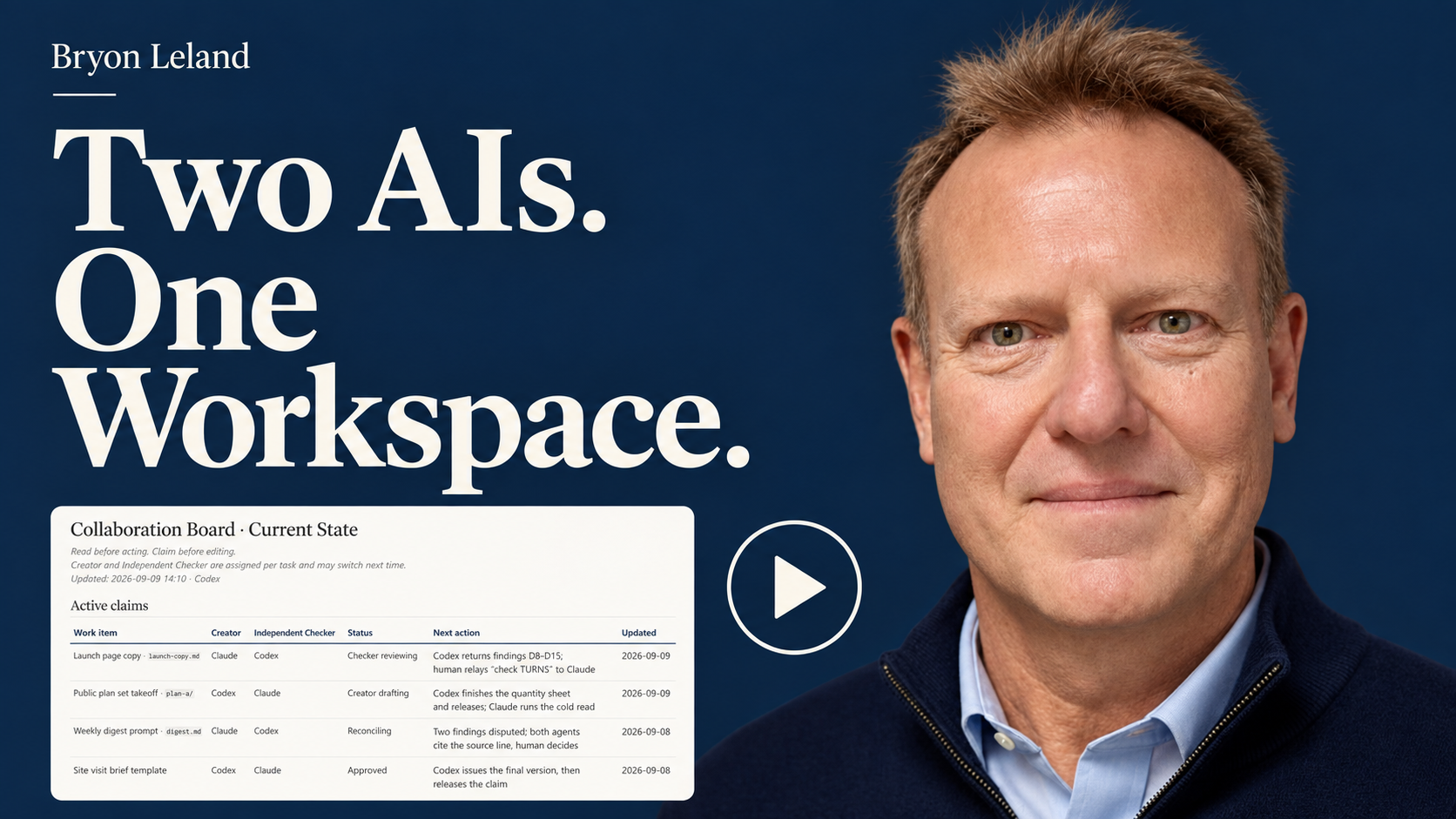
Watch the presentation (8:19) — How I use a shared board to coordinate Claude and Codex.
Read the starter kit (PDF) · Download the editable template (Word) · Download the complete kit (ZIP) · The case study
The lead generation system.
It pulls permit activity from several jurisdictions and sorts it into market areas, project phases, construction types, and client types that we can market to appropriately. It adds whatever owner information is public, screens out who shouldn’t be called, and hands the sales team a list that keeps their notes through the next refresh.
The rest of my life.
Twelve domains in one workspace, each with its own written context, so the estimating, the school volunteer work, the family logistics, and the learning all run through the same method. The first seven domains took about three weeks. Still running every day. The closeout routine I wrote for estimating now ends every session, including the one for a school fundraiser.
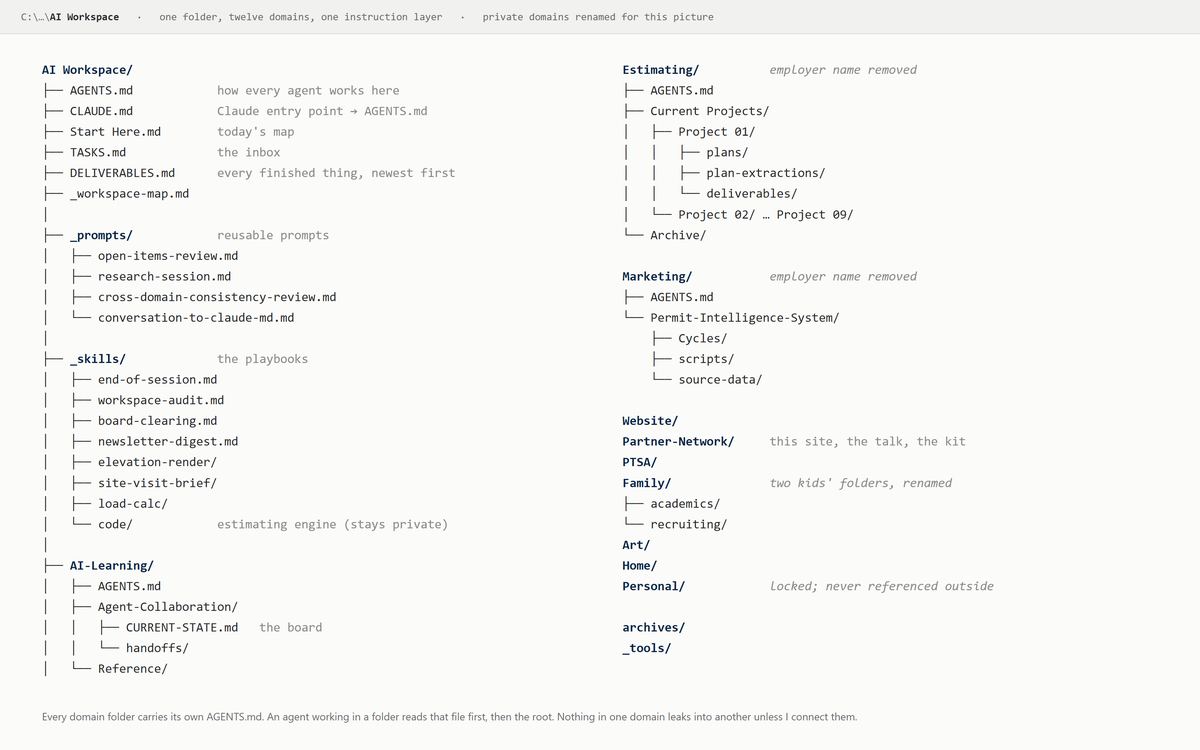
The workspace as it sits on my desk, with the private folders renamed for the picture.
Plan extraction and estimating, run on a public plan set.
I wanted to show the method without using anyone's private drawings, so I ran the San Diego County Standard ADU Plan A set through the system I use at my own desk.
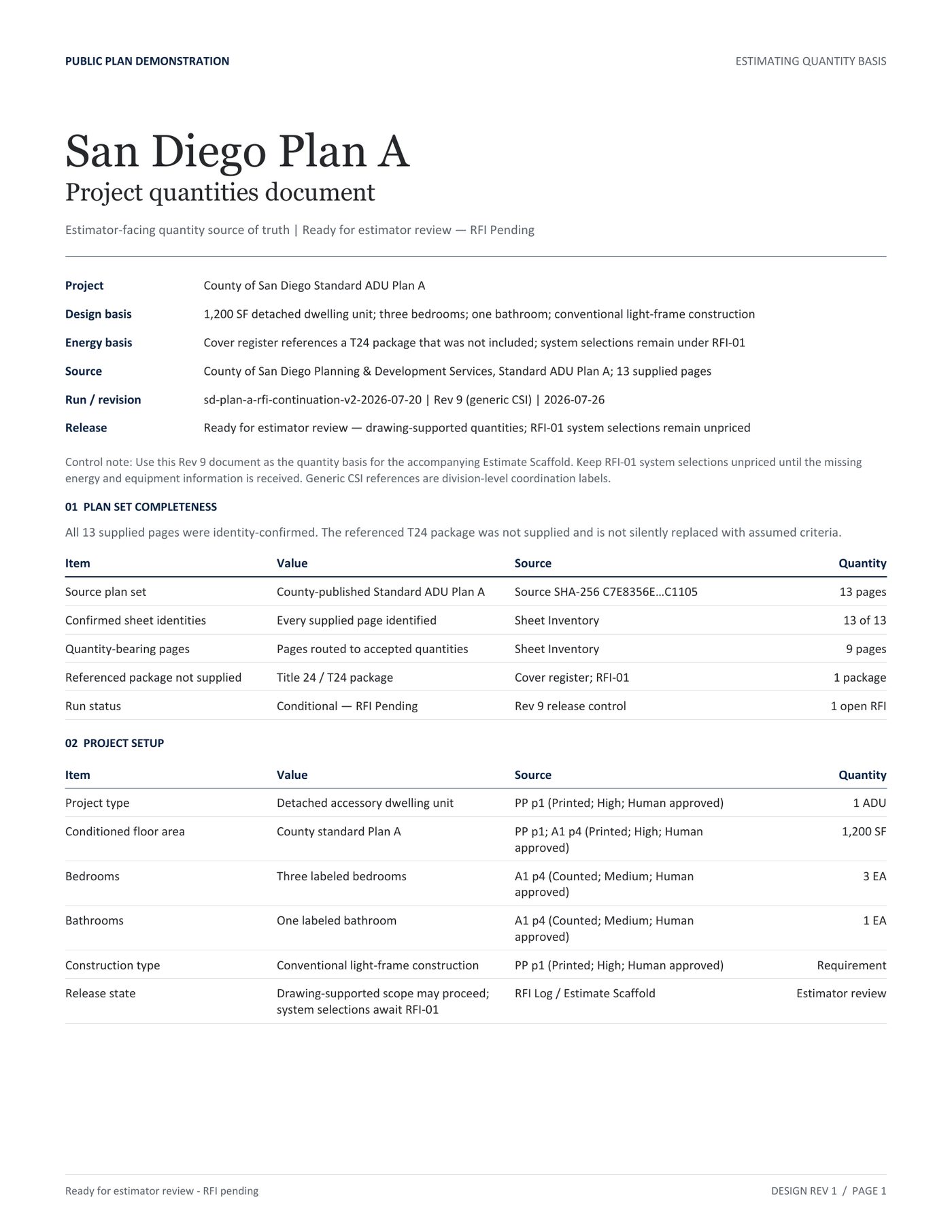
All 13 supplied pages identity-confirmed before anything was read.
Evaluated 89 selected quantity and scope targets. Found 42. Recorded 47 as not present rather than guessing.
Every accepted fact against its sheet. 24 work items compiled, 19 supported by the drawings.
Five items held behind one RFI for a missing energy package. Unit costs left blank. The run stopped where the drawings stopped.
Tools you can take.
These are the actual files I run, with my employer’s name and my own project details stripped out. Take them, change them, tell me what you like, tell me what broke. The production estimating engine, the load calculator, and the site-visit brief stay in the shop. Those are how I earn a living. The full estimating kit is here.
Multi-Model Collaboration Board Starter Kit
The board template, the five rules, and the challenge loop. No code. This is the kit from the August talk.
Read the starter kit (PDF) · Download the editable template (Word) · Download the complete kit (ZIP)
Collaboration Board Prompt Pack
Seven copy-and-paste prompts: pick the creator and checker, build the board, activate each side, reconcile a disagreement, relay between apps.
Download ZIP · Word and PDF
Model Orchestration skill
A top model runs the job as project manager and hands the bulk work to cheaper models with written briefs. Includes the sizing gate that says when not to bother.
Download ZIP · Skill folder
Elevation Render skill
Plan-faithful 3D exterior renders from a manifest: deterministic Blender geometry, opening and roof validation, locked cameras, a photoreal pass only after the geometry passes. Public copy with my project examples removed.
Download ZIP · Skill folder
AI Estimating System, public kit
The company-agnostic version of the whole estimating workflow: plan extraction with 600 DPI tiling, two independent readers, the text-layer lock, and the consensus gate; then the scope proposal, the blank-price worksheet, the five-phase lifecycle, and the audit and feedback loop. The method, not the scripts, with the jurisdiction as a setting. No employer, client, or project data in it.
Download ZIP · Kit folder
End of Session skill
The closeout routine. What got made, what is loose, what the instructions should learn, all in one preflight before anything is written.
Download ZIP · Skill file
Workspace Audit
A monthly read-only audit of the whole workspace: structure, dead weight, broken references, and staged cleanup candidates. It never deletes.
Download ZIP · Skill and prompt
Open Items Review
Weekly, monthly, and quarterly review of what is open, blocked, and stale across every domain, delivered as a Word document.
Download ZIP · Skill and prompt
Board Clearing
Triages every row on the collaboration board into six dispositions and says who acts and what the holdup is.
Download ZIP · Skill file
Newsletter Digest and Weekly Roundup
A daily AI digest built from newsletters and feeds, and a Friday best-of with post ideas in my own voice.
Download ZIP · Two skill files
How to talk to me
The communication rules I hand every agent: answer first, coworker voice, scannable, no filler.
Download ZIP · Skill file
Research Session Prompt
The monthly sweep across every domain for new tools and features worth trying, plus the full cadence review that runs the weekly, monthly, and quarterly reviews in one sitting.
Download ZIP · Prompt set
Session prompts
Turn a conversation into a handoff, review a domain, audit a folder, archive what is stale.
Download ZIP · Prompt set
Let’s compare notes.
If you’re using AI in your work, I’d like to hear about it. If you try any of the tools here, let me know what works for you and what needs improving.
Practical AI for the people who build.
I build and use AI systems in construction estimating and across my work. This site brings together examples of what I’ve built and selected tools you can download for free.
Plate 1. San Diego County Standard ADU Plan A, sheet A1. The system read this public plan set, checked it against the structural sheets, and handed an estimator a package to review. Pricing stayed with the estimator.
Construction worker. Contractor. AI builder.
My name is Bryon Leland Stafford. I started in the field, then built and ran Leland Construction for thirteen years. I have more than twenty years in San Diego construction and now estimate residential projects for a local builder.
That experience shapes how I build and use AI. I give it a clear scope, check the work against its sources, and make the final judgment when something is missing or the results disagree.
The plan reader.
It renders every page at 600 DPI and cuts it into overlapping tiles, because at full size you can't capture the detail you can with smaller, focused images. The text layer is pulled separately for notes, callouts, and schedules. Gemini reads every tile for symbols, dimensions, and schedules; a GPT model challenges the quantity-bearing sheets without seeing Gemini's answers. Every number is checked against the text layer or a close-up crop before it's accepted, and every fact carries its sheet reference.
Where the two readings disagree, the conflict is recorded and I settle it against the drawing. What the plans don't show gets written down as absent, not guessed. Before anything gets built from the numbers, a second reader goes through the same plans cold and we compare.
This is the tile where it counted the bath fixtures and read the door schedule. The numbered circles are eight of the 89 targets from the run.
The multi-model estimating system.
The reader feeds an estimating system that gives me back a sheet inventory, a quantity takeoff, scope organized by trade, an estimate structure with the prices left blank, and an RFI log for what the plans don’t say. Two models read the sheets independently, and I settle every disagreement before anything is accepted. I use it every day, and the two public ADU plan sets on this page are the same run I do at my desk.
On the public Plan A run, the cover sheet referenced an energy package that wasn’t in the 13 pages I gave it. It wrote that down as missing and parked five items behind one RFI instead of filling in a guess. That is the behavior I care about most.
Two AIs, one workspace, and a collaboration board.
I use Claude and Codex in the same workspace, with one building and the other checking the work. They communicate with each other through a collaboration board that keeps track of whose turn it is, the discrepancies that need to be resolved, the work that was just done, and what the next model is expected to do. This back and forth has been instrumental in producing much more accurate results. I walked the AI with Kyle community through the setup in August and shared the starter kit.
Watch the presentation (8:19) — How I use a shared board to coordinate Claude and Codex.
Read the starter kit (PDF) · Download the editable template (Word) · Download the complete kit (ZIP) · The case study
The lead generation system.
It pulls permit activity from several jurisdictions and sorts it into market areas, project phases, construction types, and client types that we can market to appropriately. It adds whatever owner information is public, screens out who shouldn’t be called, and hands the sales team a list that keeps their notes through the next refresh.
The rest of my life.
Twelve domains in one workspace, each with its own written context, so the estimating, the school volunteer work, the family logistics, and the learning all run through the same method. The first seven domains took about three weeks. Still running every day. The closeout routine I wrote for estimating now ends every session, including the one for a school fundraiser.
The workspace as it sits on my desk, with the private folders renamed for the picture.
Plan extraction and estimating, run on a public plan set.
I wanted to show the method without using anyone's private drawings, so I ran the San Diego County Standard ADU Plan A set through the system I use at my own desk.
All 13 supplied pages identity-confirmed before anything was read.
Evaluated 89 selected quantity and scope targets. Found 42. Recorded 47 as not present rather than guessing.
Every accepted fact against its sheet. 24 work items compiled, 19 supported by the drawings.
Five items held behind one RFI for a missing energy package. Unit costs left blank. The run stopped where the drawings stopped.
Tools you can take.
These are the actual files I run, with my employer’s name and my own project details stripped out. Take them, change them, tell me what you like, tell me what broke. The production estimating engine, the load calculator, and the site-visit brief stay in the shop. Those are how I earn a living. The full estimating kit is here.
Multi-Model Collaboration Board Starter Kit
The board template, the five rules, and the challenge loop. No code. This is the kit from the August talk.
Read the starter kit (PDF) · Download the editable template (Word) · Download the complete kit (ZIP)
Collaboration Board Prompt Pack
Seven copy-and-paste prompts: pick the creator and checker, build the board, activate each side, reconcile a disagreement, relay between apps.
Download ZIP · Word and PDF
Model Orchestration skill
A top model runs the job as project manager and hands the bulk work to cheaper models with written briefs. Includes the sizing gate that says when not to bother.
Download ZIP · Skill folder
Elevation Render skill
Plan-faithful 3D exterior renders from a manifest: deterministic Blender geometry, opening and roof validation, locked cameras, a photoreal pass only after the geometry passes. Public copy with my project examples removed.
Download ZIP · Skill folder
AI Estimating System, public kit
The company-agnostic version of the whole estimating workflow: plan extraction with 600 DPI tiling, two independent readers, the text-layer lock, and the consensus gate; then the scope proposal, the blank-price worksheet, the five-phase lifecycle, and the audit and feedback loop. The method, not the scripts, with the jurisdiction as a setting. No employer, client, or project data in it.
Download ZIP · Kit folder
End of Session skill
The closeout routine. What got made, what is loose, what the instructions should learn, all in one preflight before anything is written.
Download ZIP · Skill file
Workspace Audit
A monthly read-only audit of the whole workspace: structure, dead weight, broken references, and staged cleanup candidates. It never deletes.
Download ZIP · Skill and prompt
Open Items Review
Weekly, monthly, and quarterly review of what is open, blocked, and stale across every domain, delivered as a Word document.
Download ZIP · Skill and prompt
Board Clearing
Triages every row on the collaboration board into six dispositions and says who acts and what the holdup is.
Download ZIP · Skill file
Newsletter Digest and Weekly Roundup
A daily AI digest built from newsletters and feeds, and a Friday best-of with post ideas in my own voice.
Download ZIP · Two skill files
How to talk to me
The communication rules I hand every agent: answer first, coworker voice, scannable, no filler.
Download ZIP · Skill file
Research Session Prompt
The monthly sweep across every domain for new tools and features worth trying, plus the full cadence review that runs the weekly, monthly, and quarterly reviews in one sitting.
Download ZIP · Prompt set
Session prompts
Turn a conversation into a handoff, review a domain, audit a folder, archive what is stale.
Download ZIP · Prompt set
Let’s compare notes.
If you’re using AI in your work, I’d like to hear about it. If you try any of the tools here, let me know what works for you and what needs improving.